

n8n/table-mutation-data-orchestrator.json.
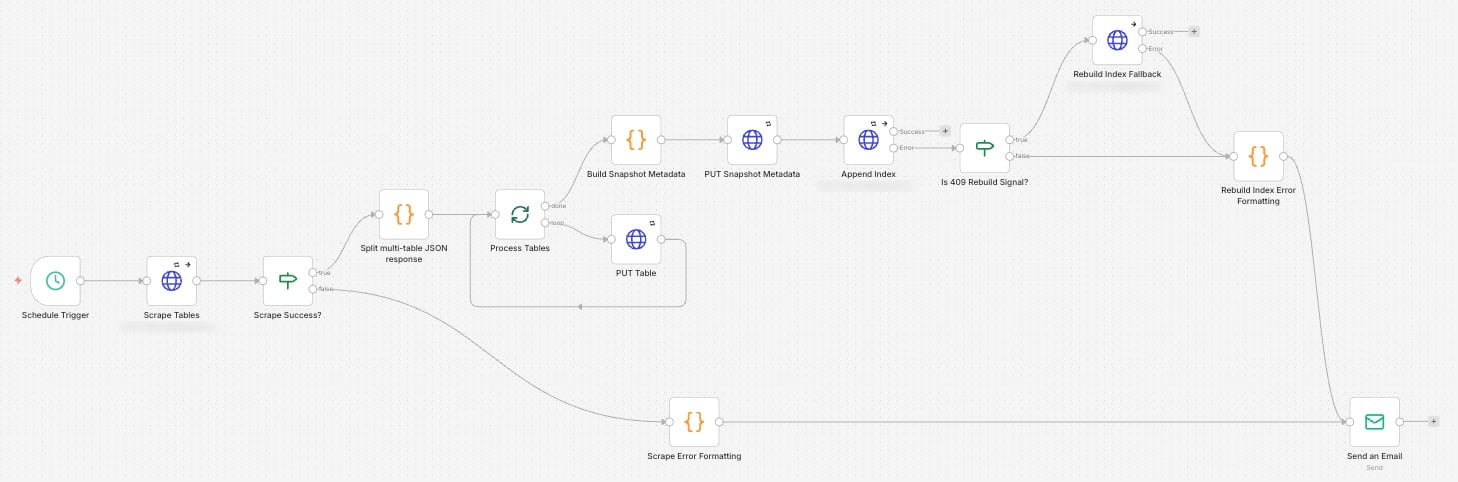
The scrape pipeline in the n8n editor
The success path
1
Schedule Trigger
Starts a run on whatever cadence you configure, in the instance’s time zone. Once a day is enough for most portals; more frequent runs raise the chance of bot-detection challenges.
2
Scrape Tables
HTTP Request to
POST /scrape. The X-Webhook-Secret header comes from an n8n Header Auth credential, so the secret never appears in the exported workflow.3
Scrape Success?
The scraper returns HTTP 200 even when the scrape fails, with
status: "error" in the body. This IF node branches on that field, which keeps failures visible as data rather than as opaque HTTP errors.4
Split multi-table JSON response and Process Tables
A Code node turns the response into one item per class. A Loop Over Items node sends them one at a time to PUT Table, which commits
assignments.json through the GitHub Contents API.5
Build Snapshot Metadata and PUT Snapshot Metadata
After the last class, a Code node assembles
metadata.json from the scrape response and commits it.6
Append Index
HTTP Request to
POST /append-index with the snapshot’s date and time. The scraper diffs it against the previous snapshot and appends the entry to the rolling index.The fallback path
/append-index refuses a snapshot older than the newest index entry and returns HTTP 409. That happens if a run is replayed out of order or the index has drifted.
Is 409 Rebuild Signal? checks the error’s status code. On a 409, Rebuild Index Fallback calls POST /rebuild-index, which recomputes the whole index from every snapshot. Any other error goes straight to notification.
Error handling
Both failure branches format a message and route it to Send an Email:- Scrape Error Formatting covers login failures, portal changes, and anything else that stops the scrape.
- Rebuild Index Error Formatting covers append failures other than 409 and a failed rebuild.
Credentials
n8n behaviors worth knowing
Use JSON body mode for requests to the scraper
Use JSON body mode for requests to the scraper
An HTTP Request node in Raw body mode with a
JSON.stringify(...) expression double-encodes the body, and FastAPI rejects it with a 422. Set Body Content Type to JSON and Specify Body to JSON instead.$json changes after every HTTP Request node
$json changes after every HTTP Request node
Downstream of an HTTP Request node,
$json is that node’s response, not the original input. Reference earlier data explicitly, for example $('Scrape Tables').first().json.data.Import always creates a new workflow
Import always creates a new workflow
The Import option in the editor never updates an existing workflow. To change one in place, use the REST API:
PUT /api/v1/workflows/{id} with an X-N8N-API-KEY header.A credential dropdown shows 'No credentials yet'
A credential dropdown shows 'No credentials yet'
The node still references a credential ID that was deleted. Switch Authentication to None and back, then select the current credential.
Set HTTP Request timeouts above the platform's
Set HTTP Request timeouts above the platform's
A full scrape, with its deliberate delays between pages, can take more than a minute, so Scrape Tables and Rebuild Index Fallback use a 300-second timeout. Append Index does constant work per snapshot and uses 30 seconds. The container platform’s own load balancer timeout can be shorter than n8n’s; see Troubleshooting.